Epsilon MDENet Training
Antonio Garcia-Dominguez
October 26, 2021
Introduction
Who am I?
- Lecturer in Computer Science at Aston University
- Committer in Eclipse Epsilon since 2011
- Used Epsilon for several approaches:
- Test design and generation
- Process-oriented website generation
- Self-adaptive system introspection
- Timetable optimisation and export/import
Session outline
- Basics: models, metamodels, etc.
- High-level view of the Epsilon project
- Exercises with the Epsilon Playground:
- EOL: the base expression language
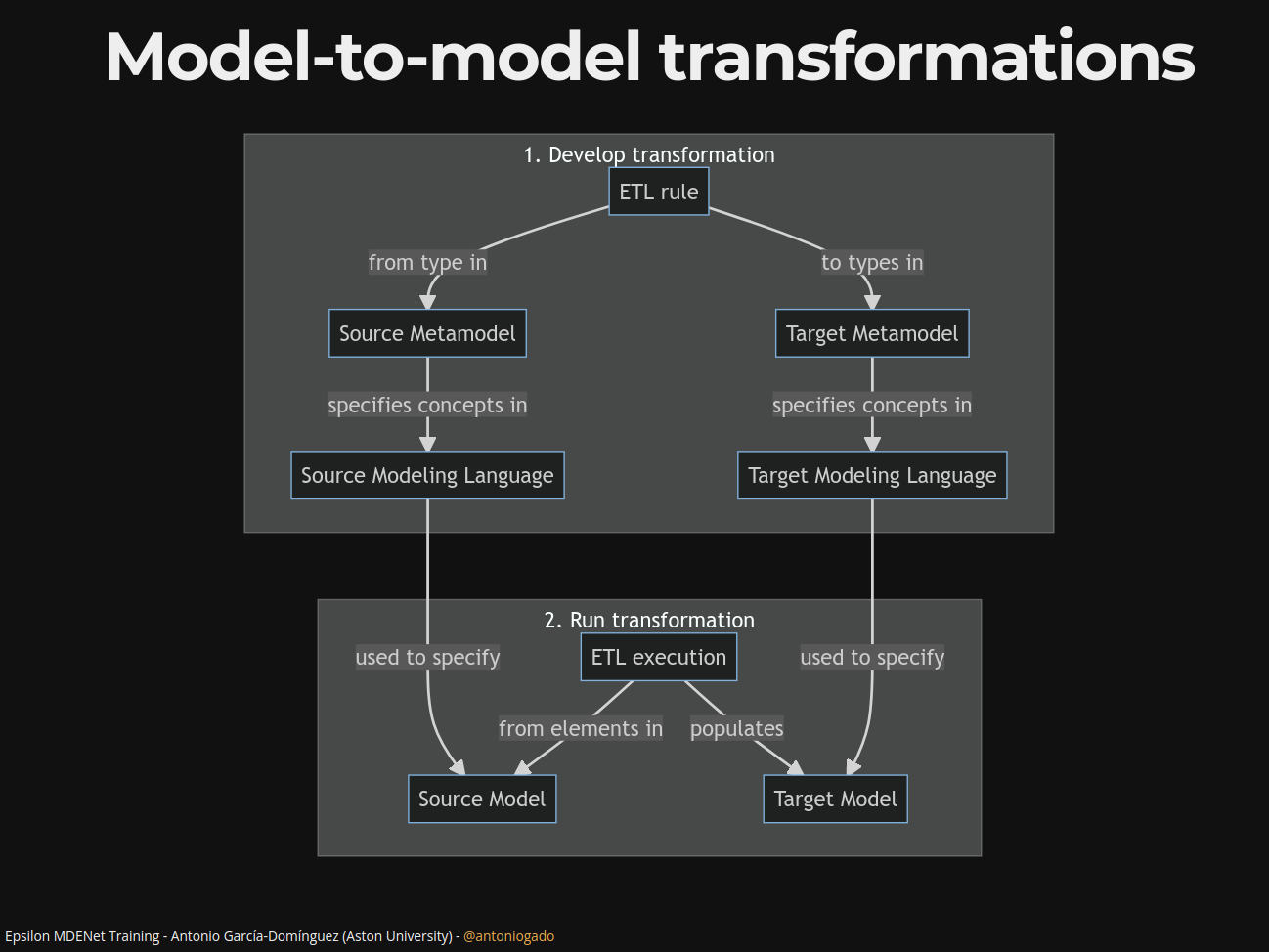
- ETL: transform a model to another model
- EGL: generate text from a model
What is Model-Driven Engineering?
- In “traditional” engineering, we develop the system directly on the implementation language
- Model-driven engineering (MDE) uses instead modeling languages specific to the problem
- A railway engineer cares about railways: the actual implementation will come later!
This JOT blog post talks about what MDE is not, too!
Some basic terms in MDE (1/2)
- We are developing a system (e.g. a railway control system)
- The model describes a part of it (e.g. the tracks, sensors, and actuators)
- A modeling language is used to specify the model
(e.g. railML) - A modeling language has:
- Abstract syntax: concepts
- Concrete syntax: notation (graphical, textual, tabular…)
Some basic terms in MDE (2/2)
- To reduce the cost of making a modeling language, we often use a metamodeling language (e.g. Ecore from EMF, or XML Schema)
- We create a metamodel of the concepts of the language, which drives its implementation (e.g. an
.ecoreor.xsdfile) - We use other tools (e.g. Sirius or Xtext) to implement the concrete syntax (notation)
Some examples of modeling languages
Where does Epsilon come into play?
- A model is more than just documentation:
- We can do early validation on the model
- We can transform the model to another language
- We can produce reports and code from it
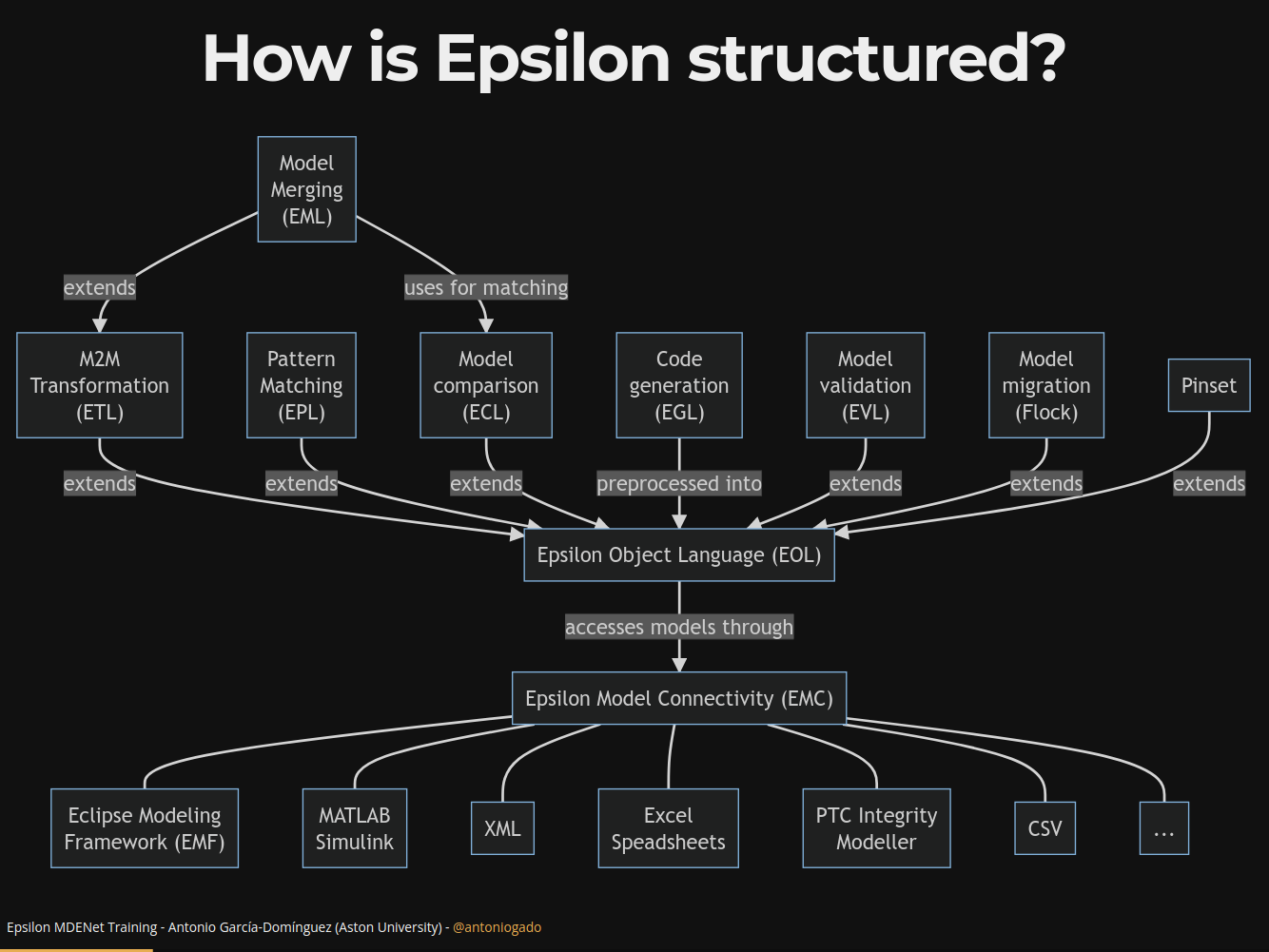
- Eclipse Epsilon provides a family of languages dedicated to model-to-model transformation, code generation, model validation, and other common MDE tasks
How is Epsilon structured?
How can Eclipse Epsilon be used?
- We will use the Playground to learn the basics
- The Eclipse-based editors are best for rapid development of Epsilon scripts
- Epsilon scripts can be embedded into:
- Your own Eclipse plugins
- Your JVM-based programs (using plain JAR distributions from Maven Central)
- Your Ant/Maven/Gradle build processes
Hands-on exercises: Epsilon Object Language (EOL)
First steps
- We’ll start with EOL, the base for all other Epsilon languages: it provides imperative code blocks, modularity, and expressions
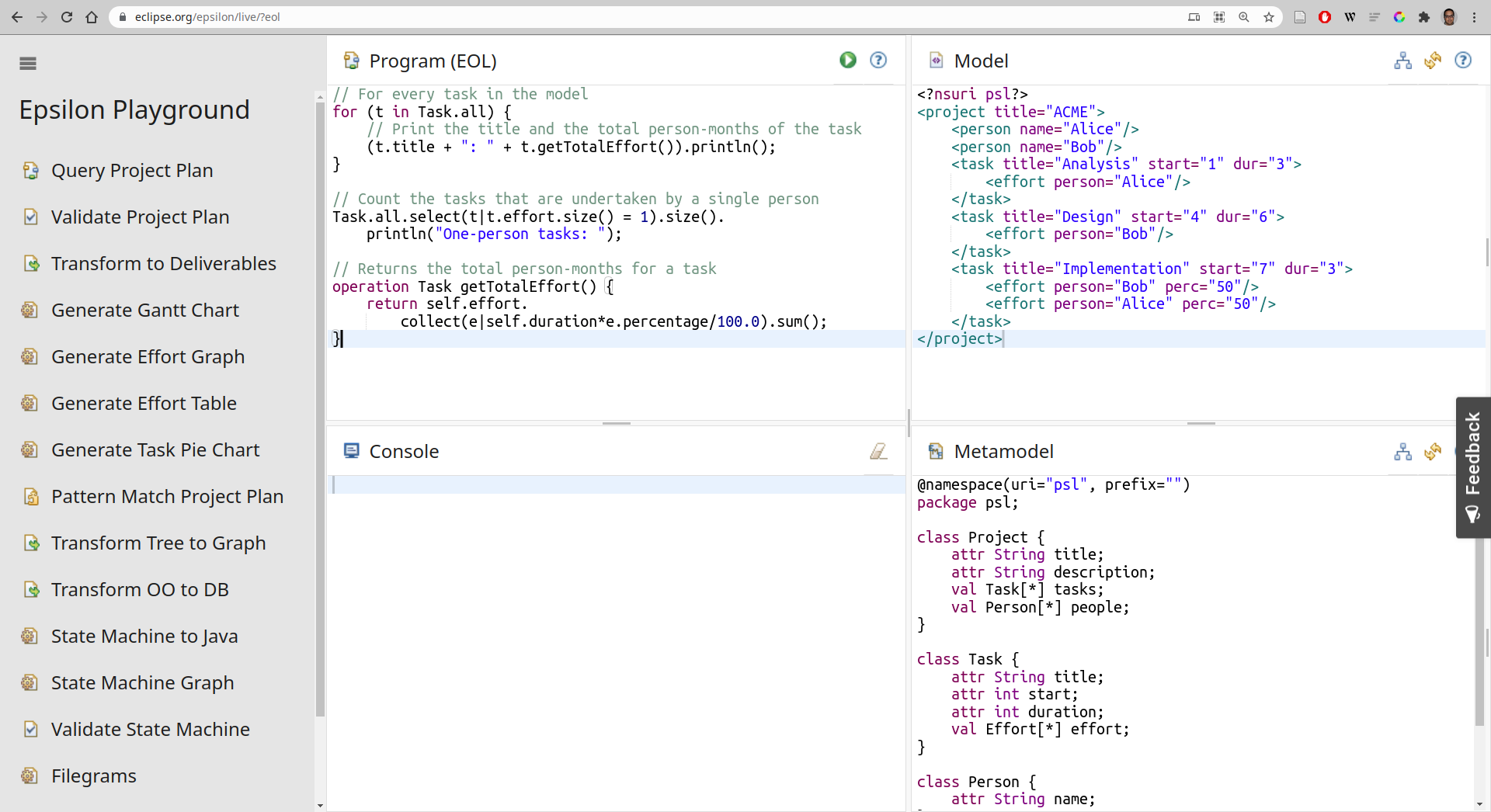
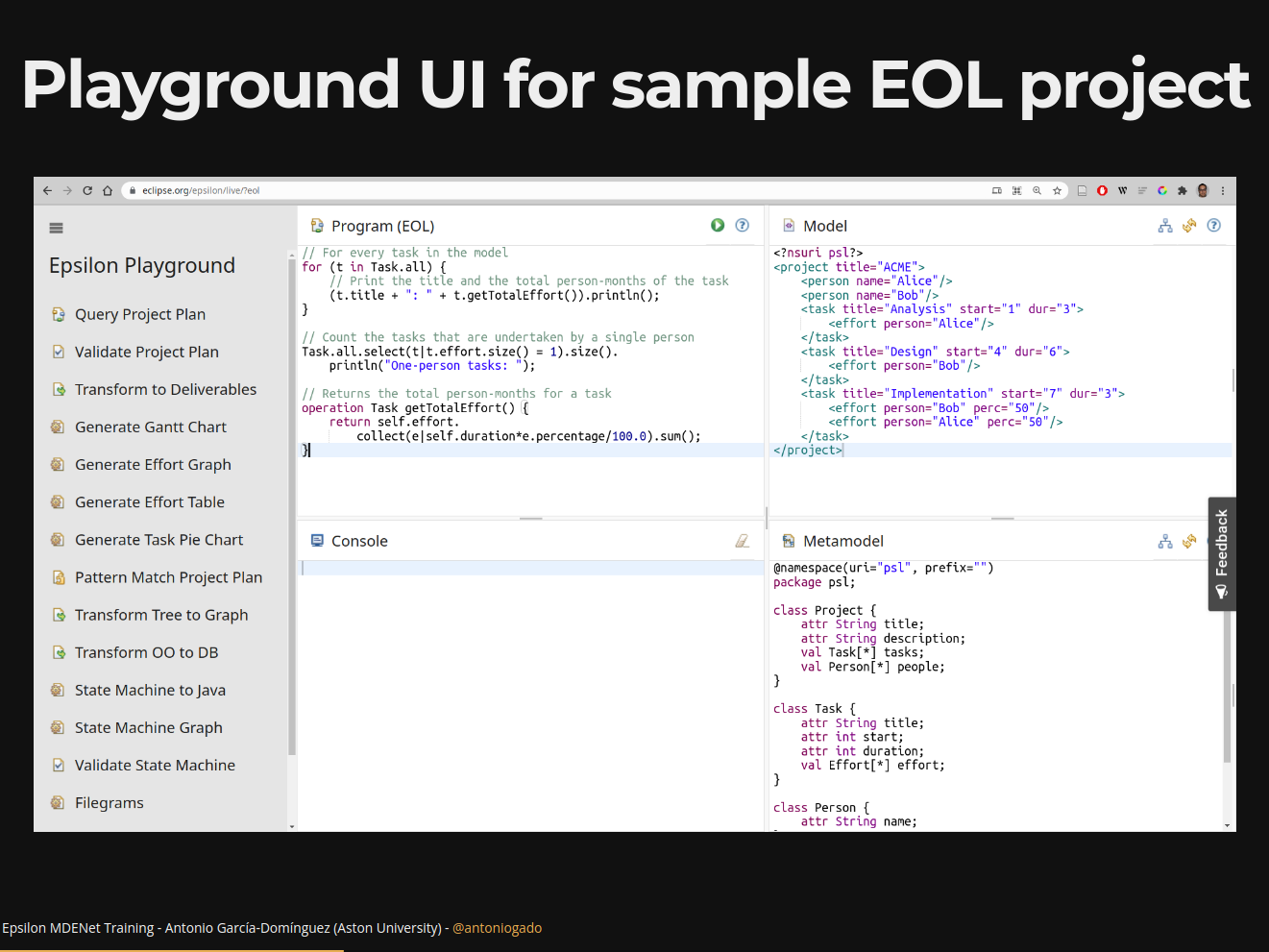
- Please open the Epsilon Playground
- Select the “Query Project Plan” example project
Playground UI for sample EOL project
Metamodel for sample EOL project
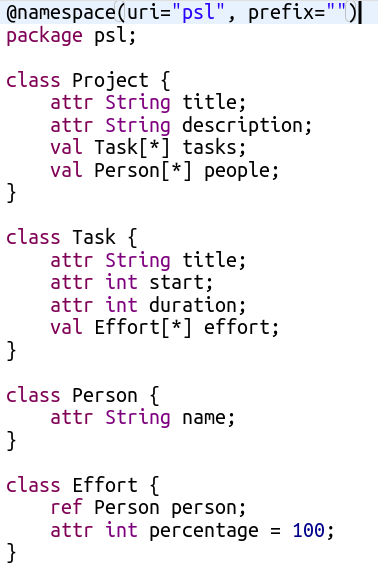
- Playground uses Emfatic as concrete syntax for metamodels
- Metamodel describes a task tracking domain-specific modeling language (DSML):
- Projects have title + description, contain 0+ tasks and people
- Tasks have title + start + duration, contain effort assignments
- People have names
- An effort assignment has percentage, refers to a person
Model for sample EOL project
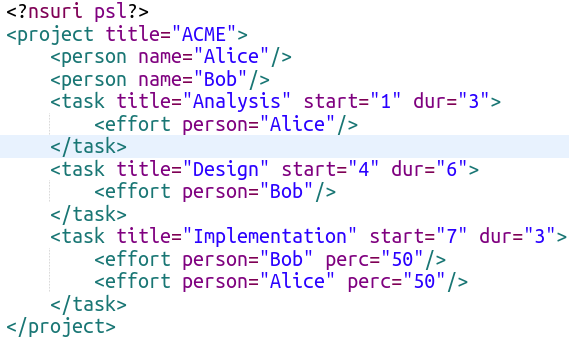
- Playground uses “fuzzy” Flexmi XML for models
- Alice and Bob work across 3 tasks (analysis, design, and implementation)
First bit of EOL code!
Replace the “Program” with this, and click on
![]() :
:Type.all= collection of allTypeinstancesAll collections support a number of operations:
firstreturns the first elementprintln()is one operation supported by any value: you can also provide a string as a prefix (e.g."title: ")
 :
:Looping with for
A “foreach” loop in EOL is done as follows:
Change the code to print the title of all tasks
First-order operations
- Show only the tasks longer than 3 days
- Two approaches:
ifinside theforloop (as in C / JavaScript)- Use
collection.select(e | condition)
- EOL collections have other useful “first-order operations” like
select, replacing many loops:- Closures, key-value mappings, first match
- Universal/existential quantifiers
- Sorting by expression, etc.
Context operations
Let’s refactor the idea of “large task” to a context operation: place it at the end of “Program”.
Now you can do
t.isLarge(3)iftis aTaskIt’s useful to create a library of operations for your DSML, which you can reuse from any Epsilon script by using the
importstatement.
In-place transformations
EOL is often used for small imperative in-place model transformations
For instance, if we want to add a new person:
Try adding a “Testing” task taking 4 days before your
forloop: it should appear in the output
Hands-on exercises: Epsilon Transformation Language (ETL)
Model-to-model transformations
First steps with ETL
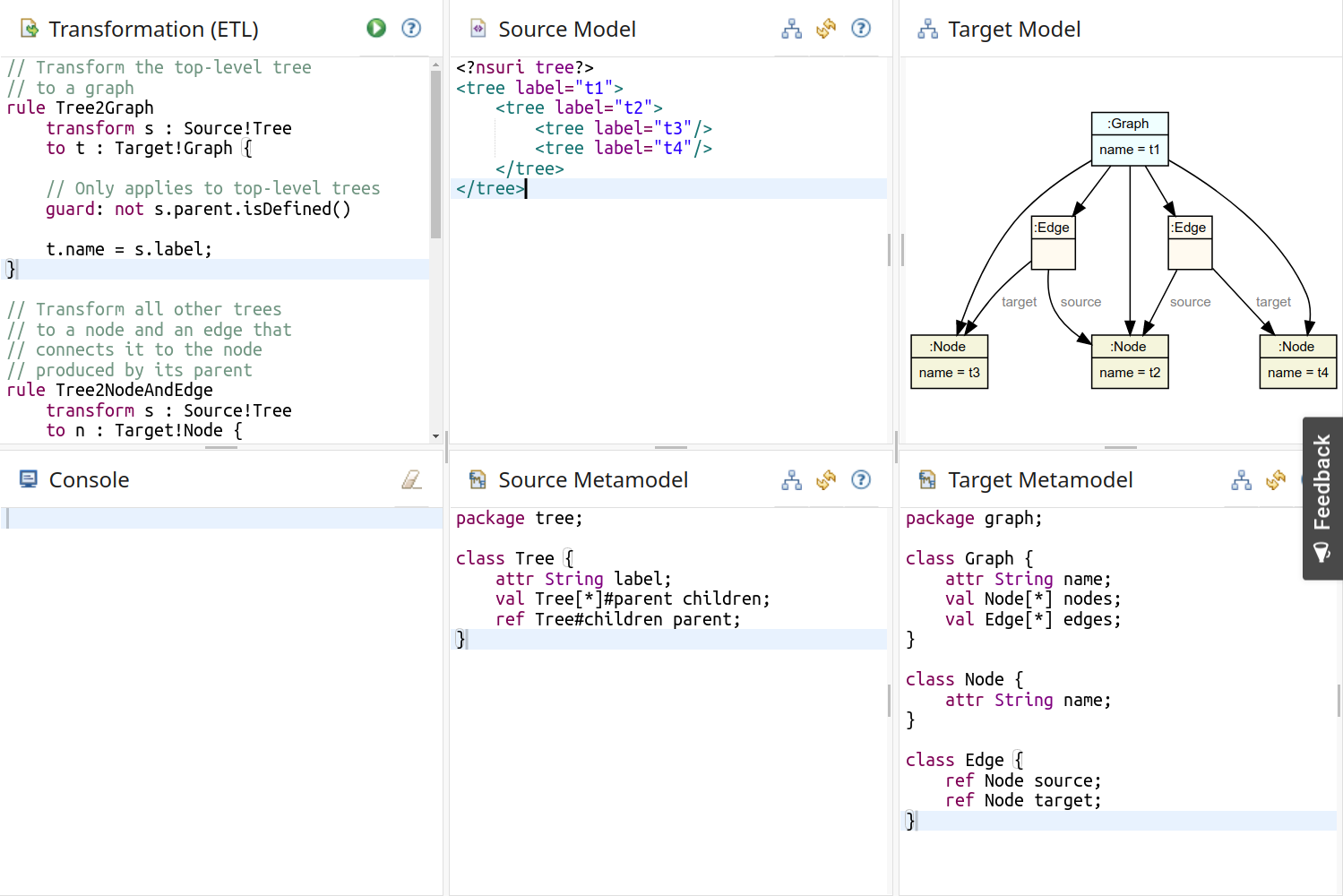
- We will work on transforming a tree model into a graph model, step by step.
- Open the “Transform Tree to Graph” sample project in the Playground.
Playground UI for sample ETL project
Creating our first rule
- Replace the contents of “Transformation” with this, and click on
![]() :
:
Source!Tree:Treetype in source metamodelTarget!Graph:Graphtype in target metamodel- We get four
Graphs (one perTree)
Adding a guard
- We only want the
Graphfrom the rootTree - We can set a condition as a guard for the rule
- Alternatively, the guard can be a block of EOL code returning a Boolean value
Adding the name
- Besides a guard, the body of a rule can have arbitrary EOL code: loops, variables, etc.
- Can you set the name of the
Graphto the label of theTree?
Mapping trees to nodes
- Try adding a rule that:
- Produces
Nodes fromTrees which have a parent - Sets the
nameof theNodeto thelabelof theTree
- Produces
Adding the nodes to the Graph
- Extend
Tree2Nodeto add the newNodeto thenodesof theGraph:- Fetch the only
Target!Graph - Access its
nodes add()theNode
- Fetch the only
Adding child edges with equivalent()
- Next, we want to link the new
Nodeto all its children: this requires knowing theNodes that were produced from the childTrees - ETL has the
t.equivalent()operation for this: called on aTree t, it will return the first element produced from it
Try extending the Tree2Node rule to do this.
Adding parent edges: extended rule
There is more to ETL!
We haven’t touched on quite a few things:
- Rule scheduling:
@primary/@lazy/@greedy - Rule inheritance and overriding
- The
::=operator - Persistence and use of transformation traces
Walkthrough: Epsilon Generation Language (EGL)
What is EGL for?
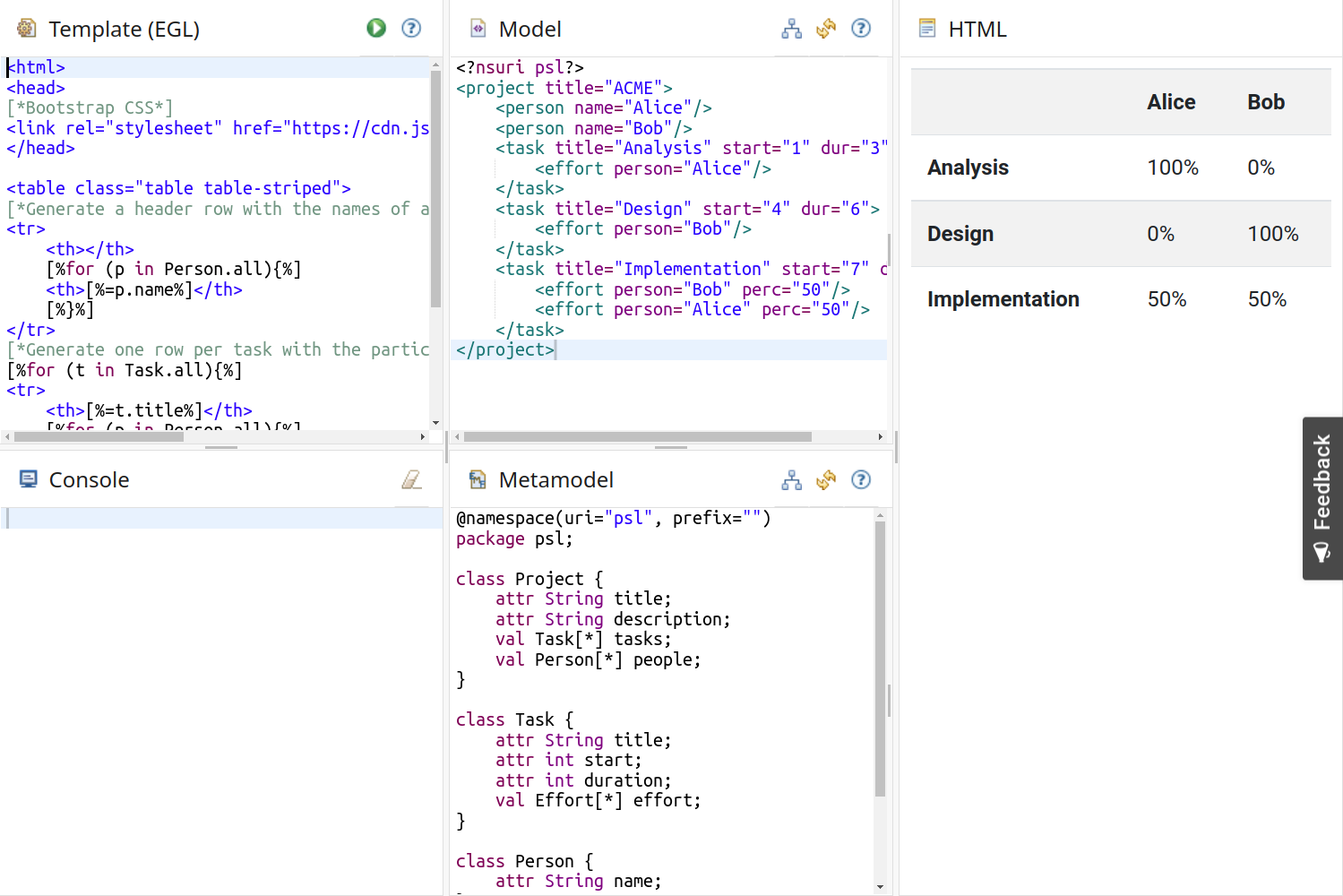
- EGL implements model-to-text transformations: we can produce code, reports, images (e.g. using Graphviz) from a model
- EGL is a templating language, in the style of Twig, Jinja, or raw PHP
- The Playground visualisations and the Picto tool are based on EGL
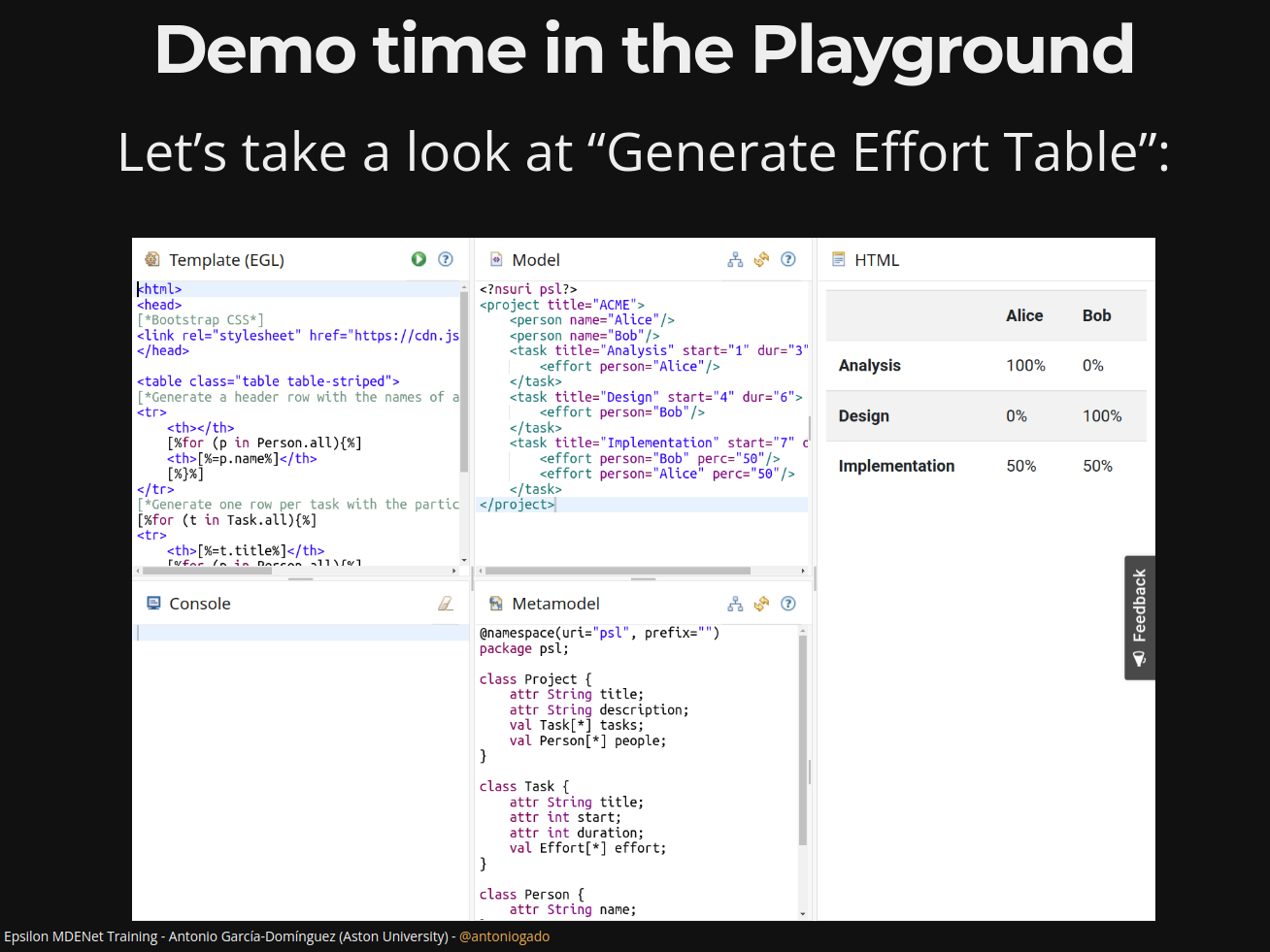
Demo time in the Playground
Let’s take a look at “Generate Effort Table”:
Other EGL features
- Protected regions, which can be customized by developers and kept across regenerations
- Formatters, i.e. for automatically indenting code according to style guidelines
- Coordination through the EGX language, for producing multiple files
Conclusion
Session recap
Thank you!
Antonio Garcia-Dominguez
a.garcia-dominguez AT aston.ac.uk